Troubleshooting
Frequent issues
At the moment, we are aware of four possible causes of syncing issues:
Number 1:
You’re on an older version of the module. To ensure that you’re on the current version, please visit the module’s page, here.
Number 2:
A dScryb password is required to sign into the module; however, if you registered to dScryb via Google or Facebook, then you may not yet have a dScryb password. The solution is to go to your dScryb account and create a dScryb password by clicking “Change Password”. Then, use that password to sign into the dScryb Foundry VTT module.
Number 3:
If you are using The Forge, you may experience a syncing issue. We are hoping to deploy a fix very soon, but there is a temporary solution: Refresh your web browser then click Sync on the dScryb module.
Number 4:
If neither of the above apply to you, then it is possible that your syncing issues are caused by a conflict between the dScryb module and another as-yet unidentified module. In this situation, we ask that you to install and run the Foundry module “Find the Culprit!“, and to report back to us the results to assist us in resolving the issue for you and others.
In addition to the above, there’s also a bug-reporting module that dScryb is hooked up to, which automatically gives us a wealth of information to debug with: Bug Reporter.
We are committed to constantly improving the module. Please don’t hesitate to contact us to report any issues or suggestions.
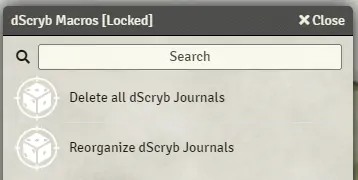
My dScryb Foundry VTT module has placed journal entries in the wrong place!
Some users have experienced an issue where dScryb journal entries are not placed in the correct folder during a sync. We apologize if you have experienced this. While we investigate this issue, we have added two macros to the Compendium to make resolving the issue easier: